cat what-the-server-sees
The server can't read a single word.
CipherMesh is a chat that lives in your terminal. Messages are encrypted on your machine and decrypted on your friend's. The relay in between only forwards sealed envelopes — it has no way to open them.
$ npx ciphermesh@latestyou › the key never leaves this machine
peer › so the relay only ever moves noise?
you › that is the entire idea
yKlM6JS2O0N0UrRqR3fiezbv6aALiPQOIBCnGEFtgim8
E5jF1BwsnTk+X4+nlGu5ZTr0svhxf+8dlF1QxctFePKK
zLs5cM1sXFqzkuwyGEVHHOweYIt6D27ceSq26cz+n9TZ
Same message, both sides. The envelope is padded to a fixed size, so its length says nothing about what is inside — and it is not signed with a name, so the relay cannot tell who sent it.
ciphermesh --version
- version
- 2.9.0 — published on npm
- tests
- 443 passing, green on every push
- commands
- 66 in the client, 63 of them offline too
- transport
- X25519 + ML-KEM-768, sealed sender, padded
- license
- MIT — fork it, run it, read it
Every line below is checkable in the repository.
ciphermesh /help
What you get
Every one of these is in the client today — not a roadmap.
ml-kem-768
Hybrid post-quantum
X25519 plus ML-KEM-768, mixed into the ratchet root. Traffic recorded today stays unreadable to a future quantum computer, and security never drops below the classical construction.
double-ratchet
Perfect forward secrecy
A Double Ratchet gives every single message its own key. Compromising a device today does not open yesterday's conversations.
sealed-sender
Sealed sender
The relay does not even learn who sent a message. Add fixed-bucket padding and optional cover traffic and it cannot tell chatting from idle.
argon2id
Private rooms
Password-protected rooms where the password never leaves your machine. The server stores only a verifier, in memory, and the room dies with its last member.
alt+1..9
Multi-room buffers
Be in several rooms at once and switch with Alt+1..9. Which room a message belongs to travels inside the encrypted payload — the relay never learns it.
mdns
Serverless P2P
Drop the relay entirely: peers find each other over mDNS on the local network, with nearly the same command set.
ciphermesh --threat-model
What the operator can and cannot do
This is worth being blunt about, because it is the whole point of the design.
The operator can
- Route sealed envelopes between peers
- Enforce connection and rate limits
- Refuse connections from an address
- Take the service offline
The operator cannot
- Read a single message
- Delete a specific message
- Moderate a conversation
- Hand over content that does not exist in readable form
Rooms exist only while someone is inside them. When the last person leaves, the room and everything said in it are gone — there is nothing to hand over later.
ciphermesh /verify
Encryption is only half of it
Sealing a message protects it from the relay. It says nothing about who is holding the other key. CipherMesh makes that check something you can finish in about ten seconds.
in the room
› /verify peer
SAS code for peer: 8241 0937 55182
Compare thirteen digits
Both sides derive the same short code from the two public keys. Read it out on a call or hold up the QR the client prints. If the codes match, nobody is standing in the middle.
Never typed back
The code is only ever compared by humans, on a channel that is not this one. There is nothing to enter, so there is nothing for an attacker to replay.
The client remembers for you
A peer's key is pinned the first time you see it. If it ever changes, you are warned before you type the next message — not after.
/fingerprint prints your own, /trustlist shows everyone you have confirmed. None of this is buried in a settings screen.
npx ciphermesh@latest
Running in under a minute
No account, no signup, nothing to install permanently.
01
Run it
$ npx ciphermesh@latestNode 20 or newer is all you need.
02
Point it at a relay
$ ciphermesh.deType ciphermesh.de at the server prompt to use the public hub, or run your own with npx ciphermesh server.
03
Agree on a room
$ /join secret-roomBoth of you type the same room name and you are talking. Add a password to make it private.
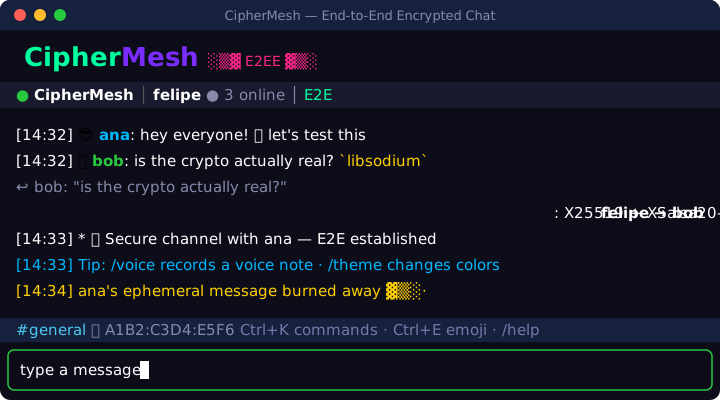
Prefer your own? The repository ships a Docker setup that gets a Let's Encrypt certificate automatically.
ciphermesh --hub ciphermesh.de
Now there is somewhere to meet
For a long time, using CipherMesh meant already knowing someone who ran a relay. That changed: ciphermesh.de is a public hub anyone can connect to, free, and it is where the project's community happens.
- Server
- ciphermesh.de
- Room
- general
That is the whole join flow. The hub is always on, so there is no need to coordinate who starts the server.
Rooms anyone can open
Pick a name, tell the people you want in it, start talking. No account, no invitation, no waiting list.
Everyone lands in general
The default room is where to go if you just want to see who else is around. Say hello — it is the closest thing the project has to a front door.
Private the moment you want it
Add a password and the room is yours. The password never reaches the server, only a verifier it cannot reverse.
Nothing outlives the conversation
A room exists while someone is inside it. When the last person leaves it is gone — no history, no archive, nothing anyone could hand over.
ciphermesh.de
What it is for
npx ciphermesh server
Need more? Then the relay should be yours
A relay you host answers to you, depends on nobody else's uptime, and does not put your conversations through a machine a stranger administers. The repository ships the Docker setup ready to go. For anything that matters it is the better answer — and it is the one the software was built for.
Host your own relayRunning the hub does not make its operator a reader. It is zero-knowledge like every other CipherMesh relay — the only difference is that this one is always on.
Hub terms of useciphermesh --panic
The commands you hope never to need
Most of CipherMesh protects the conversation. This part protects the person holding the laptop.
› /panic yesWipe everything, right now
Session, history, trust store and keys are erased from disk and the client exits. There is no undo, and that is exactly the point.
› /autolock 5Locks itself when you walk away
The screen goes behind your passphrase after the idle time you set. Type /lock to do it immediately.
› /ephemeral 10mMessages with an expiry date
Set a lifetime and everything sent from then on disappears from both ends when it runs out.
› /retention 7dKeep only what you meant to keep
Anything older than the window you choose is wiped from disk. History exists at all only if you opened the session with a passphrase.
None of this needs a server's cooperation. Every one of these is your own client acting on your own machine.
ciphermesh /plugins
Any command you wish existed
A slash command the client does not recognise is handed to your plugins. A plugin is one small ES module in ~/.ciphermesh/plugins — that file is the entire API.
export default {
  name: 'roll',
  description: 'Roll dice',
  commands: {
    roll: (args) => ({
      send: `🎲 ${d(args[0])}`,
    }),
  },
}
then, in any room
› /roll 2d20+3
Answer straight into the room
A handler that returns send posts its text into the room, through the same end-to-end encrypted path as anything you type. One that returns info shows it to you alone.
Runs peer-to-peer too
The same file works in P2P mode, where there is no server involved at all. Nothing about a plugin depends on a relay.
Nothing is ever downloaded
CipherMesh does not sync, fetch or auto-update plugins. The only way code reaches that folder is you putting it there.
No sandbox — read it before you run it
A plugin is arbitrary JavaScript inside your chat process, with access to your keys in memory. Treat a plugin file the way you treat curl | sh: install only what you wrote or read line by line.
ciphermesh --license
Free, and open all the way down
CipherMesh costs nothing and always will. The source is public under the MIT license — including the cryptography, which is exactly the part you should never have to take on faith.
Read it yourself
Every claim on this page is checkable in the repository. The protocol and threat model are documented in full.
Bring an idea
Found a bug, want a feature, disagree with a design decision? Open an issue. Pull requests are welcome too — the contributing guide covers the workflow.
ciphermesh --thanks
Support the project
CipherMesh is built and maintained in spare time, and the public hub runs on a server that costs real money every month. If it is useful to you, a coffee helps keep both going.
Entirely optional. Nothing in CipherMesh is paywalled, and nothing ever will be.